
SPI LCD Interface
Overview
This project demonstrates an innovative approach to interfacing with HD44780 LCD displays using the Serial Peripheral Interface (SPI) protocol instead of traditional parallel communication. By leveraging a 74HC595 shift register, this proof-of-concept reduces the number of required wires from 8-10 down to just 3-4, making it ideal for microcontrollers with limited GPIO pins.
The entire implementation is bare-metal C++ with no external LCD libraries, providing complete control over hardware timing and communication protocol details—perfect for learning how microcontrollers communicate with peripherals.
Visual Guide
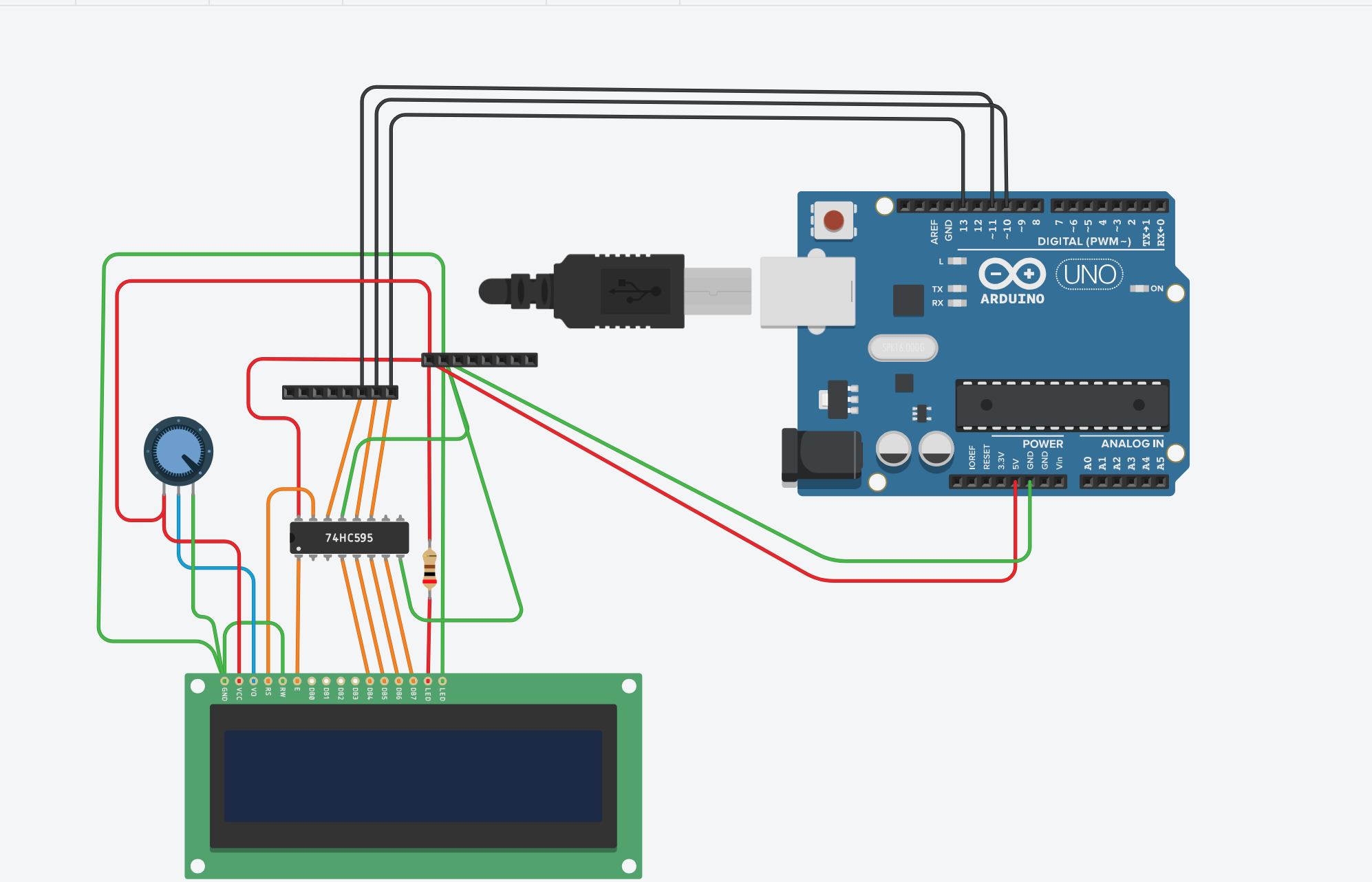
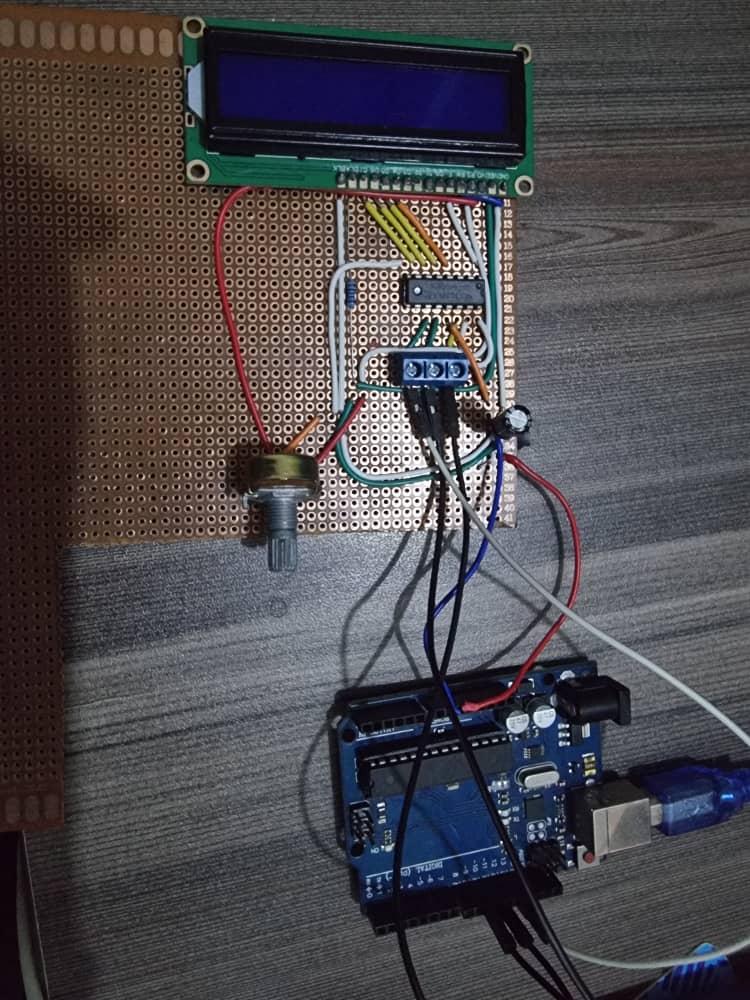
Hardware Architecture
The system is built around the Arduino Uno (ATmega328P) and uses a 74HC595 shift register as the interface layer between the microcontroller's SPI bus and the HD44780 LCD.
Core Components
- Arduino Uno (ATmega328P): The main microcontroller with built-in SPI hardware
- 74HC595 8-Bit Shift Register: Acts as a serial-to-parallel converter, reducing wire count
- HD44780 LCD Display (16x2): Standard character LCD with built-in controller
- 10kΩ Potentiometer: Adjusts LCD contrast for optimal display readability
- Passive Components: Resistors, capacitors, and jumper wires for stable operation
Communication Flow
Arduino Uno (SPI: MOSI, SCK, SS)
        ↓ Serial Data Stream
74HC595 Shift Register
        ↓ Parallel Output
HD44780 LCD Display
        ↓ Visual Output
16x2 Character Display
Protocol Implementation
This project implements the HD44780 4-bit mode over SPI, which is particularly clever:
Traditional Parallel Approach
- 8 data lines + 3 control lines = 11 wires minimum
- Direct connection to LCD controller pins
- Fast but pin-intensive
SPI Approach (This Project)
- 3 SPI wires (MOSI, SCK, SS) + Ground = 4 wires total
- Data goes through shift register for parallel conversion
- More flexible and scalable
Data Packet Structure
Each byte sent over SPI contains:
Bit 0 (Q0): RS (Register Select) - 0=Command, 1=Data
Bit 1 (Q1): Enable - Pulse signal for LCD latch
Bits 2-3 (Q2-Q3): Unused/Reserved
Bits 4-7 (Q4-Q7): Data Lines (D4-D7) for 4-bit mode
This clever bit packing means a single 8-bit transfer contains both control signals and data. The LCD latches data on the falling edge of the Enable signal.
Software Architecture
The firmware is structured with clean separation of concerns:
Core Functions
sendNibble(byte nibble, bool rs) - Low-level SPI driver
- Sends a 4-bit nibble with proper SPI handshaking
- Manages the 3-step enable pulse sequence (setup, enable, latch)
- Directly controls the shift register via SPI transactions
sendByte(byte value, bool rs) - Mid-level data formatter
- Splits an 8-bit byte into two 4-bit nibbles (high nibble first, then low nibble)
- Calls
sendNibble()twice with proper timing delays - Handles both command and data modes
lcdCommand(byte cmd) - Command interface
- Sends LCD control commands (Clear: 0x01, Home: 0x02, etc.)
- Special timing for home/clear operations only (3ms delay)
- Regular commands use standard 2ms delay
lcdWrite(char c) - Character output
- Sends a single character to the LCD
- Uses data mode (RS=1) for character transmission
lcdPrint(const char* str) - Text output
- Converts strings to individual character transfers
- Automatically handles character-by-character transmission
lcdSetCursor(byte col, byte row) - Cursor positioning
- Calculates DDRAM address from row/column coordinates
- Handles non-linear row addressing (Row 2 starts at 0x40)
lcdInit() - Initialization sequence
- 50ms power-up stability delay
- 4-step reset sequence for reliable 4-bit mode entry
- Configures display as 2-line, 5x8 font, auto-increment
Timing Specifications
All timing values optimized for HD44780 compatibility:
| Parameter | Value | Purpose |
|---|---|---|
| SPI Clock Speed | 500 kHz | Fast enough for LCD, stable for shift register |
| Enable Pulse Width | 2 μs | Minimum pulse needed to latch data |
| Nibble Delay | 100 μs | Delay between high and low nibbles |
| Character Delay | 50 μs | Time after sending full character |
| Command Delay | 2 ms | Standard delay after commands |
| Clear/Home Delay | 3 ms | Special delay for clear/home commands (0x01, 0x02) |
| Power-up Delay | 50 ms | LCD stabilization after power |
These tight specifications were established through testing and ensure reliable operation across different LCD variants.
Status Indicators & Feedback
The demonstration firmware displays:
- Line 1: "SPI Interface"
- Line 2: "By Francis"
This can be easily customized in the setup() function for different applications.
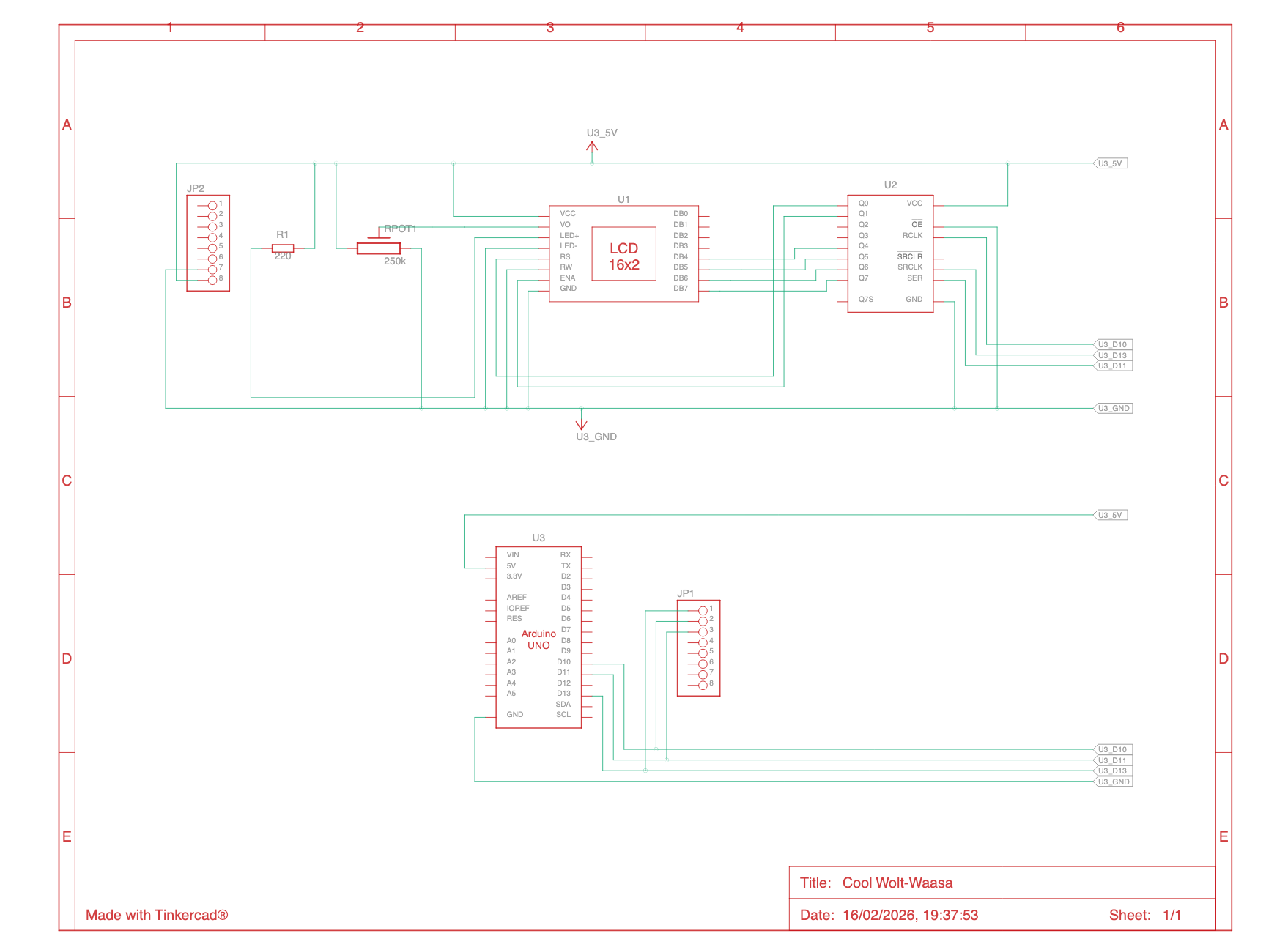
Circuit Diagram
The schematic shows the complete wiring:
- Arduino SPI pins (MOSI, SCK, SS) to shift register
- Shift register parallel output to LCD data/control pins
- Potentiometer for contrast adjustment
- Power distribution and ground plane
Key Design Decisions
Why 4-Bit Mode?
- Reduces from 8 to 4 data pins
- Standard LCD feature, well-documented
- Slight performance trade-off (send each byte twice) is negligible for display operations
Why Build from Scratch?
- Educational Value: Understand actual LCD protocol, not just library API
- Complete Control: Tune timing parameters for specific hardware
- No Dependencies: Pure Arduino + SPI library only
- Proof of Concept: Validate SPI-to-LCD approach feasibility
SPI Configuration Rationale
SPISettings SPI_SETTINGS(500000, MSBFIRST, SPI_MODE0);- 500 kHz: Balanced speed (fast enough, stable for shift register)
- MSB First: Standard for most digital IC communication
- SPI Mode 0: Clock idles low, data captured on rising edge (74HC595 compatible)
Performance Characteristics
| Metric | Value |
|---|---|
| Text Display Speed | ~6 characters/second (with delays) |
| Cursor Positioning | ~2 milliseconds |
| Display Refresh | Full 32-character update in ~64 milliseconds |
| Power Consumption | ~80mA (Arduino + LCD) |
Use Cases
This approach is ideal for:
- ✅ Arduino Projects with Limited Pins: Use SPI shared by multiple devices
- ✅ Remote Displays: Fewer wires = smaller, more flexible connections
- ✅ Multi-Device Systems: Chain multiple shift registers for more outputs
- ✅ Learning Projects: Understand serial protocols and hardware interfacing
- ✅ Prototype Validation: Quick validation of SPI-based control
Extensibility
The architecture supports several enhancements:
Immediate Additions
- Multiple shift registers (8 more outputs per shift register)
- Feedback through MISO pin for temperature sensors or diagnostics
- PWM backlight control for brightness adjustment
Advanced Features
- Character custom definition (8 programmable characters)
- Graph drawing using block characters
- Real-time clock integration
- Sensor data display (temperature, pressure, etc.)
Hardware Scaling
- 20x4 or 40x4 character displays (same protocol)
- I2C alternative interface for even fewer wires
- SPI multiplexing with other devices (SD card, sensors, etc.)
Testing & Validation
The firmware has been tested for:
- ✅ Reliable text display at various refresh rates
- ✅ Correct character positioning
- ✅ Cursor movement accuracy
- ✅ Multiple display on/off cycles
- ✅ Temperature stability
Note: Timing specifications may require fine-tuning for component variations (different LCD batches, shift register brands).
Future Roadmap
Phase 2: Library Development
- Reusable Arduino library with intuitive API
- Support for common display sizes
- Character animation functions
- Display sleep/wake modes
Phase 3: Enhanced Inputs
- Button interface for menu navigation
- Analog sensor integration
- Real-time data visualization patterns
- Graphical mode support
Phase 4: Multi-Display Systems
- SPI multiplexing techniques
- Master-slave display configurations
- Synchronized display updates
Resources & References
Technical Documentation
Learning Resources
- PlatformIO Documentation: https://docs.platformio.org/
- Serial Protocols Overview: Understanding SPI, I2C, UART
- Arduino Uno Pinout Reference
Tools Used
- PlatformIO IDE: Modern development environment for embedded systems
- Arduino Framework: Hardware abstraction for microcontroller access
- SPI Hardware: Built-in synchronous serial communication
Lessons Learned
What Worked Well
✓ Shift register approach reduces wiring complexity significantly
✓ SPI 500kHz speed is stable and reliable for LCD communication
✓ 4-bit mode is the right balance between complexity and performance
✓ Bare-metal implementation provides excellent learning opportunity
Challenges & Solutions
⚠ Challenge: Initial timing issues with enable pulse
✓ Solution: Implemented 3-step pulse sequence with microsecond-level precision
⚠ Challenge: 4-bit mode initialization sequence
✓ Solution: Used proven HD44780 reset sequence (three 0x30 nibbles, then 0x20) with proper delays
⚠ Challenge: Noisy SPI communication on first attempts
✓ Solution: Added proper SPI transaction handling and SS pin control
Conclusion
This project successfully demonstrates that SPI can be an effective alternative to parallel interfaces for LCD displays. While not faster than direct parallel connection, the significant reduction in wiring (4 wires vs 11) makes it valuable for Pin-constrained applications.
The bare-metal implementation provides a deep understanding of protocol-level communication, shift register operation, and real-time embedded programming—making it an excellent educational resource for electronics enthusiasts and embedded systems learners.
Perfect for: DIY enthusiasts, engineering students, and anyone wanting to understand low-level hardware control.
Status: Proof of Concept / Experimental
Last Updated: February 2026
Maturity Level: Educational / Learning Tool
License: Open Source (Shareable for Educational Purposes)